|
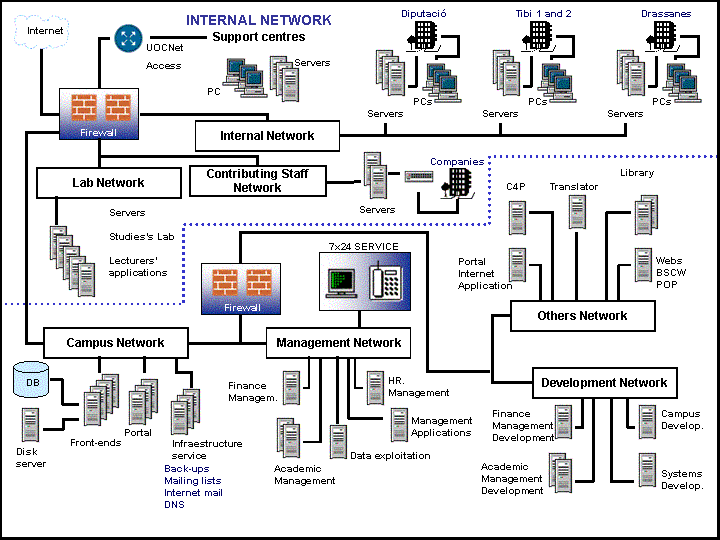
Internal Network
This is the
network to which all UOC
staff workpoint PCs are connected, as well as the printers
and file
servers* and printer
servers*.
From the physical point of view, the internal network
includes the following facilities:
|
|  |
Tibidabo I,II,III
|
|
| |
Diputació
|
|
| |
Drassanes
|
|
| |
World Trade Center
|
|
| |
Support Centres
|
And it has the following resources:
|
| |
File and printer servers (Windows 2000)
|
|
| |
Work point PCs (Windows 98) and peripherals (scanners,
readers, CDs...)
|
|
| |
Telework service (Web access via CITRIX tool
and Terminal Server)
|
Resources accessible to the user from the internal
network (UOC staff):
|
| |
Workpoint PC and printer, and departmental scanners
|
|
| |
Base software (Windows 98, Office 2000, Web browsers,
McAfee anti-virus, Outlook)
|
|
| |
Disk spaces
| |
M User's own
unit |
| |
N Unit shared
by areas |
| |
G Unit shared
by faculty or operating group |
| |
P Unit shared
by everyone |
|
|
| |
Telework service through which the user may obtain
access to these disk units via Web (connection
by means of UOCNet)
|
Workpoint support service:
This is a service given to all UOC
staff in a centralised manner. The service offers the
following functions:
|
| |
Maintenance of users access to the different
disk spaces.
|
|
| |
PC, printer and peripheral maintenance and incident
solution.
|
|
| |
Base software maintenance and incident solution.
|
|
| |
Daily back-up copies of users' data. Information
restoration on request by users. These copies
do not, in any way, include the hard
disk* of the users' PCs and, consequently,
it is strongly advised not to save important information
on the hard disk, as it would not be possible
to retrieve it.
|
|
| |
Laptop loan service.
|
|
| |
Computer in the meeting room.
|
Notifications of incidents by users of the internal
network are made by a management application.
Campus Network
This is the network to which the servers providing
the intranet and the extranet services offered by the
University are connected.
The services are the following:
|
| |
Educational Intranet
|
|
| |
Portal
|
|
| |
Name server
|
|
| |
Internet mail server
|
|
| |
Distribution lists server (lists of users to
whom a user can send messages)
|
The Educational Intranet service is made up of the
following elements:
|
| |
Servers with identical configuration which work
as web
server* and distribute the workload among
themselves.
|
|
| |
Database
server* which contains the dabatase of the
Educational Intranet, where users, profiles, preferences,
assignations and privileges are defined. It has
an historical record of messaging, connections,
sessions, and actions relating to the Educational
Intranet.
|
|
| |
Disk server containing all the messages, Web
documents, didactic materials, and any other content
which may be accessible from the Educational Intranet.
|
The UOC portal
is made up of three Web servers with identical configuration
which distribute the workload among themselves.
The Internet mail
server* centralises both incoming and outgoing mail.
It also has the role of being the UOC's
primary
dominions server*.
There is another mail server whose function is to route
messages sent from the UOC,
but not through the Educational Intranet. In addition,
it carries out the distribution lists service.
Others Network
This is where the servers providing the intranet and
the Internet service are connected. These servers require
a less stringent security level, or contain applications
developed by third parties.
The services that should be singled out here are:
|
| |
Internet applications server (the portal's
part in which information is not of a fixed type,
but rather is looked for at the time of presenting
the Web page).
|
|
| |
The Virtual
Library service, which is made up of a database
server and a Web server.
|
|
| |
Automatic translation service (automatic translation
system by SAIL-LABS).
|
|
| |
Server containing applications from websites
depending on the portal.
|
|
| |
POP*
service server, BSCW (a public tool for group
work online), and initiatives or third party websites.
|
Management Network
This is where the management application servers are
connected. It is the network under the greatest degree
of protection, given the more confidential nature of
the data with which work is done.
The services which should be singled out here are:
Development Network
The servers where in the new developments of the University's
applications are carried out are connected to this particular
network.
The following are the servers:
|
| |
Servers for the development of the Educational
Intranet (one for the new versions and another
for the maintenance of current versions).
|
|
| |
Servers for the development of the management
applications.
|
|
| |
Servers for the Idea-Solutions product.
|
|
| |
Servers for systems development and tests.
|
Lab Network
This is the network to which the servers devoted to
teaching or experimental practice or tests are connected.
The following are the most notable services:
|
| |
Laboratory for the faculties
|
|
| |
Computing, communications and systems practices
and tests.
|
|
| |
Applications used by the teaching staff.
|
Contributing Staff
Network
This is the network to which the servers devoted to
contributing staff are connected through a switch.
|